


Work Smarter: The Role of Docking Stations for Laptops in Remote Work
Remote work has reshaped how professionals use technology in their daily workflow. With multiple applications, virtual meetings, and data-heavy tasks becoming the norm, a standard laptop setup often falls short in delivering efficiency and comfort. This is where modern docking stations for laptops in remote work environments play a significant role.
Users looking to enhance their workstation can explore a wide selection of docking stations for laptops and hybrid workspaces, with options available to suit different devices, connectivity requirements, and productivity needs.
A laptop alone provides portability, but a docking station transforms it into a full workstation. From multiple displays to expanded USB connectivity, docking stations help bridge the gap between mobility and productivity.
What Are Docking Stations for Laptops?
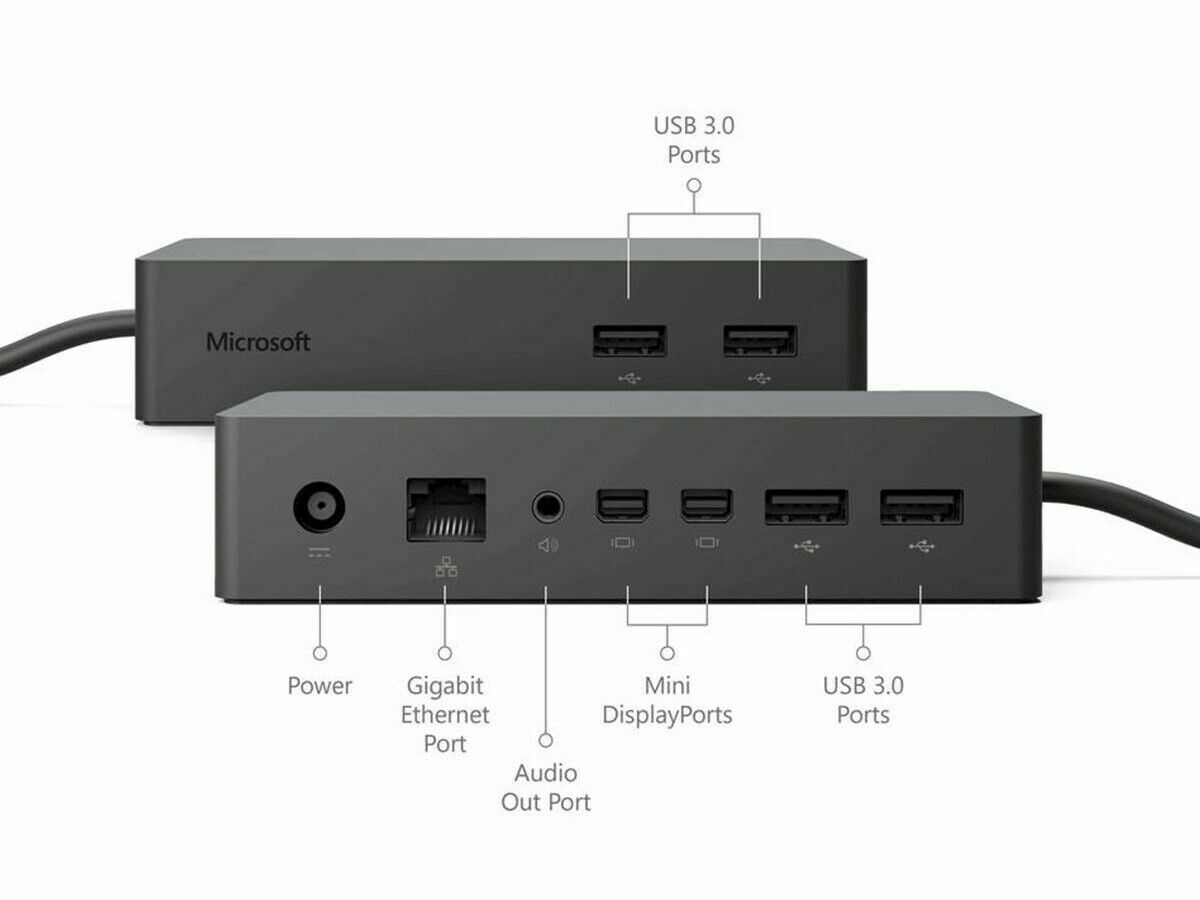
A laptop docking station is a hardware device that allows users to connect multiple peripherals to a laptop through a single connection. This includes monitors, keyboards, external storage, printers, and network cables.
Instead of plugging in multiple cables every time, users can simply connect their laptop to a dock and instantly access a complete workstation setup.
Modern docking stations come in various formats, including USB-C and Thunderbolt models, making them compatible with most modern laptops.
You can explore different configurations of docking stations for laptops designed to support a variety of professional workflows, device compatibility requirements, and workspace setups.
Why Docking Stations Are Essential for Remote Work
Remote work demands flexibility, but also consistency. Docking stations provide both by enabling a stable and efficient workspace at home or in shared environments.
Improved Productivity
A dual or triple monitor setup supported by a docking station allows users to multitask effectively. Switching between tabs becomes unnecessary when everything is visible simultaneously. This setup also helps streamline complex workflows, especially in data-heavy or creative tasks.
Reduced Cable Clutter
Instead of managing multiple cables, a single connection handles everything. This creates a clean and organized workspace, which is essential for focus and efficiency. It also makes desk setups more flexible and easier to reconfigure when needed.
Enhanced Device Longevity
Frequent plugging and unplugging of peripherals can wear out laptop ports. Docking stations reduce this strain by centralizing connections. Over time, this helps maintain hardware performance and reduces the risk of port damage.
Seamless Hybrid Work Setup
Professionals moving between office and home setups benefit from docking stations, as they can maintain identical workflows in both environments. This consistency helps reduce downtime and improves transition efficiency between different work locations.
Types of Docking Stations for Laptops
Different users have different needs, and the market reflects this with a variety of docking solutions.
Portable Docking Stations
These compact devices are designed for professionals who travel frequently. They offer essential ports without adding bulk. Portable options are ideal for freelancers, consultants, and hybrid workers who need flexibility.
You can browse portable docking stations for laptops and mobile workspaces to find compact connectivity solutions suitable for remote work, travel, and flexible office environments.
New Docking Stations
Modern workplaces require high-speed data transfer, 4K display support, and fast charging capabilities. New docking stations are designed with these advanced requirements in mind.
They often include:
- USB-C and Thunderbolt connectivity
- Dual or triple monitor support
- High-speed Ethernet ports
- Power delivery support
These features make them suitable for demanding professional environments.
Refurbished Docking Stations
For users looking for cost-effective solutions, refurbished docking stations offer reliable performance at lower prices. These units are tested and restored to ensure functionality while maintaining affordability.
Refurbished options are especially useful for startups, students, and small businesses looking to optimize costs without sacrificing productivity.
How to Choose the Right Laptop Docking Station
Selecting the right laptop docking station depends on several factors related to your workflow and hardware requirements.
Compatibility
Ensure the dock is compatible with your laptop’s operating system and port type (USB-C, Thunderbolt, etc.).
Display Requirements
If your work involves design, analysis, or multitasking, choose a dock that supports multiple external monitors.
Port Selection
Check for essential ports such as:
- USB-A and USB-C
- HDMI or DisplayPort
- Ethernet
- Audio jack
- Power Delivery
Some docking stations can charge your laptop while connected, reducing the need for separate chargers.
Budget and Usage
If you need long-term professional use, investing in a high-quality dock is recommended. For basic use, refurbished models can be sufficient.
It is also important to consider future scalability, especially if you plan to upgrade your devices or expand your workstation setup later. A well-chosen docking station can support evolving work requirements without frequent replacements.
To learn more about the company and its offerings, visit the About Docks4U page.
Selling and Recycling Docking Stations
As technology evolves, many users upgrade their hardware. This often leaves older docking stations unused.
Instead of discarding them, users can choose to sell my docking station through structured buyback programs.
Users looking to recover value from surplus hardware can explore services for selling used docking stations and IT equipment, making it easier to extend the lifecycle of existing devices while reducing electronic waste.
Benefits of Selling Old Docking Stations
- Reduces electronic waste
- Provides financial return
- Encourages sustainable technology use
- Clears unused workspace equipment
Businesses and individuals alike benefit from these recycling ecosystems.
The Future of Docking Stations in Remote Work
As remote and hybrid work continue to expand, docking stations for laptops are expected to evolve significantly to match new workplace demands and technology standards.
Key Trends
- Wireless docking technology reducing cable dependency
- Faster data transfer through next-generation ports
- Integration with cloud-based workstation systems
- Smarter power management features
These improvements are aimed at making connectivity more seamless and reducing reliance on physical interfaces, especially in mobile-first work environments.
The shift toward minimalistic and efficient workspaces will continue to drive innovation in docking solutions, ensuring that both performance and flexibility remain central to future designs.
Why Docks4U Is Relevant in This Space
Understanding connectivity solutions is easier when supported by structured resources and organized product categories. Docks4U offers access to a range of docking solutions designed to align with modern remote and hybrid work requirements, making it easier for users to evaluate different setup options based on their workflow needs.
Users can explore available options through the docking stations for laptops section, which brings together various configurations suitable for different performance levels and use cases.
For additional details or assistance, users can visit the customer support and contact page for docking station inquiries to get help with product compatibility, ordering, or general questions.
Overall, the platform helps centralize information related to docking solutions, making it easier to understand compatibility, features, and practical usage in remote work environments.
Frequently Asked Questions (FAQ)
Conclusion
Docking stations have become an essential part of modern remote work setups, enabling professionals to enhance productivity, reduce clutter, and create efficient workspaces. Whether choosing new docking stations, portable docking stations, or refurbished docking stations, the right choice depends on individual workflow requirements.
If you are looking to upgrade, recycle, or explore docking solutions, you can get in touch through the Contact Docks4U page for more details and assistance.
In a world where remote work continues to evolve, investing in the right connectivity tools ensures long-term efficiency and adaptability.