


Why a Dell USB-C Docking Station is Essential for Hybrid Work Setups
Hybrid work environments have reshaped how professionals interact with technology, workspace setups, and daily productivity tools. As employees move between home and office more frequently, the need for a consistent, reliable, and efficient connectivity solution has become essential. One of the most widely adopted solutions in this category is the Dell docking station.
Professionals and businesses looking for reliable docking stations and workspace connectivity solutions can explore a wide selection of options that support modern hybrid workflows without unnecessary complexity or cost barriers.
This article explores how docking stations improve hybrid work setups, what makes them effective, and why refurbished and used options are becoming increasingly popular among professionals and organizations.
This article explores how docking stations improve hybrid work setups, what makes them effective, and why refurbished and used options are becoming increasingly popular among professionals and organizations.
Understanding the Role of a Dell USB-C Docking Station in Hybrid Work
A docking station acts as a central connectivity hub that transforms a laptop into a full workstation. With a single USB-C connection, users can access multiple peripherals such as monitors, keyboards, external drives, and networks.
A Dell USB-C docking station simplifies this process by allowing seamless switching between home and office environments. Instead of reconnecting multiple cables every time, users can plug in one cable and instantly access their full workstation setup.
For users exploring cost-efficient options such as a used docking station for laptop setups, browsing the Docks4U Collections page can help identify compatible and budget-friendly solutions.
Why a Dell Docking Station Is Important for Modern Workspaces
The modern workplace demands flexibility, speed, and minimal downtime. A docking station supports all three by acting as a bridge between portable laptops and full desktop setups.
Centralized Connectivity
Instead of managing multiple adapters, users can connect everything through a single hub. This reduces clutter and improves workspace organization.
Multi-Device Support
Most hybrid professionals rely on multiple devices simultaneously, including external monitors, storage drives, and wired networks. A docking station supports all these needs efficiently.
Smooth Workflow Transitions
Whether working from home or in the office, a consistent setup improves productivity and reduces time wasted on reconfiguration.
A Dell docking station is particularly effective because it combines power delivery, display output, and data transfer in one streamlined solution.
Benefits of Using Refurbished and Used Docking Stations
Not every user requires a brand-new docking solution. Many professionals opt for alternatives such as a used Dell docking station or a Dell refurbished docking station due to cost efficiency and sustainability.
Advantages of Refurbished Options
- Lower upfront cost
- Environmentally responsible reuse of electronics
- Tested functionality and reliability
- Suitable for scaling office setups
For businesses looking to reduce IT expenses, refurbished solutions offer a balanced combination of performance and affordability.
Organizations can also explore solutions for selling used docking stations and surplus IT equipment to extend the lifespan of existing hardware, reduce electronic waste, and support more sustainable technology management.
Key Features That Support Hybrid Work Efficiency
A Dell docking station includes several features that make it highly suitable for hybrid environments.
Single-Cable Convenience
Users can connect their entire workstation using just one USB-C cable, which significantly reduces setup time and cable clutter. This makes switching between home and office environments much faster and more efficient.
High-Resolution Display Support
A Dell USB-C docking station supports dual or triple monitor setups, allowing users to manage multiple applications simultaneously. This is especially useful for multitasking, data-heavy work, and creative workflows.
Fast Data Transfer
USB-C connectivity ensures high-speed and stable data transfer between connected devices such as external drives and peripherals. This improves workflow efficiency and reduces delays when handling large files.
Integrated Charging
With power delivery support, a Dell USB-C docking station can charge your laptop while it is in use. This eliminates the need for separate chargers and keeps the workspace organized and efficient.
These features collectively enhance productivity and streamline daily operations.
Comparing Used, Refurbished, and New Docking Stations
|
Feature |
New Docking Station |
Used Docking Station |
Refurbished Docking Station |
|---|---|---|---|
|
Cost |
High |
Low |
Moderate |
|
Condition |
Factory new |
Previously used |
Restored & tested |
|
Performance |
Maximum |
Variable |
Near-new |
|
Warranty |
Full |
Limited/None |
Partial |
|
Sustainability |
Medium |
High |
High |
Understanding these differences helps users select the right solution based on budget and usage requirements.
Many users searching for a used Surface Pro docking station also consider cross-compatible Dell models due to broader device support.
How Docking Stations Improve Productivity in Hybrid Work
Hybrid work is not just about location flexibility; it is about maintaining productivity across environments. A docking station plays a key role in this transition.
Faster Setup Time
Employees can quickly switch between home and office setups without reconnecting multiple peripherals each time. This reduces downtime and allows work to begin almost instantly.
Improved Ergonomics
A fixed workstation setup helps maintain proper posture and reduces physical strain during long working hours. This leads to better comfort and long-term productivity.
Better Multitasking
Multiple display support makes it easier to run several applications at once, improving workflow efficiency. Users can compare data, manage tasks, and work across platforms seamlessly.
Reduced Technical Interruptions
Fewer cable connections mean fewer chances of disconnections or hardware issues during work. This ensures a more stable and uninterrupted working experience.
A Dell docking station helps standardize these benefits across different work environments.
Choosing the Right Docking Station for Your Needs
Before selecting a docking solution, it is important to evaluate your specific requirements.
Device Compatibility
Before choosing a dock, ensure your laptop supports USB-C or Thunderbolt connectivity for full functionality. Without proper compatibility, some features like display output or charging may not work as expected.
Display Requirements
Consider how many monitors you plan to use in your setup, whether it is a single display or a dual/triple monitor configuration. This helps you select a dock that supports the required resolution and screen output.
Port Selection
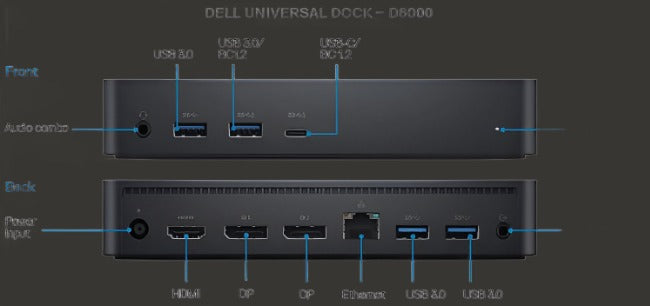
Check the available ports such as HDMI, DisplayPort, Ethernet, and USB-A based on your daily workflow needs. A well-equipped dock ensures all your essential peripherals can connect without additional adapters.
Power Requirements
Make sure the docking station provides enough power delivery to charge your laptop efficiently while in use. This helps maintain performance and reduces the need for separate charging equipment.
For more details about product standards and company practices, users can visit the About Docks4U page.
Sustainability and IT Asset Lifecycle Management
Sustainability is becoming an important consideration in IT procurement. Choosing refurbished or used docking stations helps reduce electronic waste and promotes responsible consumption.
Instead of discarding old hardware, many organizations now participate in reuse programs or resale channels.
This approach not only reduces environmental impact but also optimizes IT budgets.
Common Use Cases for Docking Stations in Hybrid Work
Docking stations are widely used across multiple industries and professional roles:
- Remote employees needing consistent home setups
- Corporate teams using multi-monitor workflows
- Developers requiring multiple connected devices
- Designers working with high-resolution displays
- Students managing study and project workflows
In each case, a Dell docking station provides a reliable and scalable solution for connectivity challenges.
Maintenance Tips for Long-Term Performance
To ensure long-term reliability:
- Keep firmware updated regularly
- Avoid overloading ports beyond specifications
- Use certified USB-C cables
- Store in clean, dust-free environments
- Disconnect properly when not in use
Proper maintenance extends device lifespan and improves stability.
Frequently Asked Questions (FAQ)
Conclusion
A Dell USB-C docking station plays a critical role in supporting hybrid work environments by simplifying connectivity, improving productivity, and enabling seamless transitions between workspaces.
Whether choosing a new model or exploring a used Dell docking station or Dell refurbished docking station, the key is selecting a solution that matches workflow needs and budget requirements.
For further assistance or inquiries, you can reach out through the Contact Docks4U page.
As hybrid work continues to evolve, investing in the right docking solution ensures greater efficiency, consistency, and long-term productivity across all work environments.