


Portable Docking Stations: The Essential Travel Accessory for Professionals
The modern workplace has changed dramatically over the last few years. Professionals are no longer tied to a single office desk or traditional workplace environment. Hybrid schedules, business travel, remote work, and flexible office arrangements have created a need for technology that supports productivity regardless of location.
While laptops have become more powerful, lighter, and easier to carry, many manufacturers have reduced the number of available ports to achieve slimmer designs. This has created a challenge for professionals who regularly rely on external monitors, wired internet connections, keyboards, storage devices, and presentation equipment.
Docking stations have emerged as a practical solution to these challenges. They allow users to transform a lightweight laptop into a complete workstation within seconds while maintaining the flexibility required for modern work environments.
Many organisations rely on a trusted source for workplace docking solutions when creating flexible work environments that support mobility and collaboration. Among the technologies supporting this shift, docking stations have emerged as one of the most practical tools available.
What Are Portable Docking Stations?
Portable docking stations are compact devices that expand the connectivity options of modern laptops through a single cable connection.
Instead of carrying several adapters and accessories, users can connect multiple devices through one hub that provides access to additional ports and functionality.
Most docking stations include:
- USB-A ports
- USB-C ports
- HDMI or DisplayPort outputs
- Ethernet connections
- SD card readers
- Audio connections
- Power delivery charging support
These features allow professionals to maintain a productive workspace whether they are in an office, hotel room, airport lounge, coworking space, or client meeting room.
Why Professionals Need Better Connectivity
Many modern laptops include only two or three ports. While this design improves portability, it can limit productivity for professionals who use multiple devices simultaneously.
Common connectivity requirements include:
- External displays for multitasking
- Wired internet connections for stability
- External storage drives
- USB accessories
- Conference room display systems
- Keyboards and mice
- Charging cables
A laptop docking station solves these issues by consolidating connectivity into a single device.
Rather than carrying separate adapters for each accessory, professionals can use one compact solution that supports their entire workflow.
The Rise of Hybrid Work and Mobile Productivity
Hybrid work has accelerated demand for portable productivity solutions.
Businesses that are exploring available connectivity products for modern workspaces increasingly prioritise devices that allow employees to transition seamlessly between locations without sacrificing performance.
Whether employees are working from home, travelling between client sites, or attending meetings in different offices, portable docking stations help recreate a familiar and productive workspace.
How Portable Docking Stations Improve Productivity
Portable docking stations improve productivity by enabling professionals to connect multiple devices, displays, and peripherals through a single connection, reducing setup time and creating a more efficient workspace anywhere.
Faster Workspace Setup
Setting up multiple devices individually can waste valuable time. With a docking station, users can connect monitors, storage devices, and peripherals instantly through one cable connection. This is particularly valuable for professionals who frequently move between workspaces.
Reduced Cable Clutter
Managing numerous adapters and cables can become frustrating during travel. It reduces clutter by consolidating multiple functions into one device. A cleaner workspace often contributes to improved organisation and efficiency.
Improved Multitasking
External displays significantly improve productivity for many professionals. Whether reviewing spreadsheets, editing content, analysing data, or participating in video meetings, additional screen space allows users to work more effectively.
Many docking stations for laptops support dual monitor configurations, making them suitable for demanding workloads.
Better Device Compatibility
Modern docks support a wide range of devices and operating systems. This flexibility allows organisations to standardise equipment across teams using different laptop brands and models.
Key Features to Look for in Portable Docking Stations
Not all docking solutions offer the same capabilities. Before purchasing, professionals should evaluate their specific requirements.
|
Feature |
Why It Matters |
|
Weight |
Easier transportation during travel |
|
Port Selection |
Supports more devices and accessories |
|
Power Delivery |
Charges laptops while connected |
|
Display Support |
Enables multiple monitor setups |
|
Build Quality |
Improves durability and lifespan |
|
Compatibility |
Supports different laptop brands |
|
Data Transfer Speed |
Improves file transfer efficiency |
Selecting a device based on actual workflow requirements often results in better long-term value.
Industries Benefiting from Docking Stations
Portable connectivity solutions are no longer limited to technology professionals. Many industries now rely heavily on docking technology.
Financial Services
Financial analysts and consultants frequently work with multiple applications simultaneously. Additional displays and improved connectivity allow faster analysis and reporting.
Healthcare
Healthcare professionals often work across multiple facilities and offices. Portable workstations simplify access to records, presentations, and collaboration tools.
Creative Industries
Designers, photographers, and video editors regularly use external storage devices and high-resolution displays. Docking stations simplify these workflows considerably.
Education
Educators and trainers frequently present materials in classrooms and conference environments. Portable connectivity allows quick access to presentation systems and external displays.
Information Technology
IT professionals often connect to multiple devices while performing diagnostics, installations, and maintenance tasks. Additional ports improve efficiency and flexibility.
Why Business Travellers Depend on Portable Docking Stations
Business travel often requires professionals to work in unfamiliar environments. Hotel rooms become offices, airport lounges become meeting spaces, and client facilities become temporary workstations.
They support these scenarios by enabling users to quickly establish productive work environments.
Working from Hotels
Many professionals spend significant time working from hotel rooms. Docking stations allow them to connect displays and accessories while maintaining an organised setup.
Presenting at Client Locations
Meeting rooms frequently contain different display systems and hardware configurations. They simplify compatibility and reduce setup issues.
Working During Transit
Long travel schedules often require professionals to remain productive between meetings. Compact docking solutions make mobile productivity more manageable.
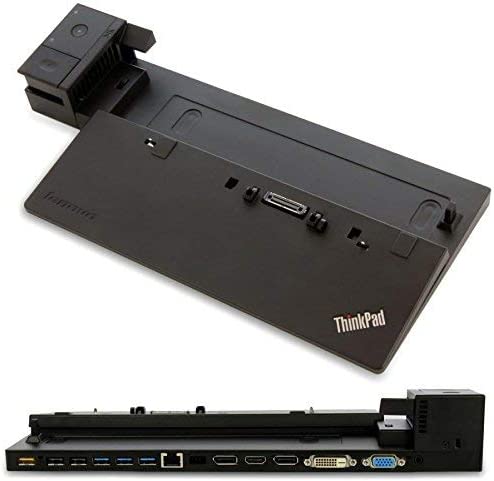
The Growing Market for Refurbished Docking Stations
Sustainability has become increasingly important for organisations investing in workplace technology.
Many companies are learning more about companies specialising in docking technology while exploring strategies that reduce electronic waste and extend equipment lifecycles.
Refurbished docking stations provide an opportunity to maximise value while supporting sustainability initiatives.
Why Companies Choose Refurbished Equipment
There are several reasons organisations invest in refurbished docking stations.
1. Lower Costs: Refurbished products often provide substantial savings compared to new hardware.
2. Reduced Electronic Waste: Extending product life cycles contributes to sustainability initiatives and environmental goals.
3. Faster Deployment: Many refurbished products are readily available and can support rapid technology rollouts.
4. Reliable Performance: Quality refurbishment processes often include testing, cleaning, and component verification.
Understanding the Secondary Docking Market
Many organisations replace equipment long before it reaches the end of its usable life.
As a result, there is growing interest from businesses looking to recover value from unused docking equipment while supporting circular technology practices and reducing unnecessary waste.
This growing market benefits both buyers and sellers while helping organisations manage technology refresh cycles more efficiently.
How New Docking Stations Continue to Evolve
Manufacturers continue introducing new docking stations with improved features and capabilities.
Recent developments include:
- Higher charging capacities
- Faster data transfer speeds
- Better display compatibility
- Support for additional monitors
- Improved thermal management
- Enhanced operating system support
These improvements ensure docking technology continues meeting the needs of modern workplaces.
Common Mistakes When Buying Docking Stations
Choosing a dock without checking compatibility, power delivery, display support, and future connectivity needs can lead to performance issues and limited functionality.
1. Choosing Based Only on Price
The cheapest solution may not provide the required features or reliability. Compatibility and performance should remain priorities.
2. Ignoring Power Delivery Ratings
Charging requirements vary significantly between devices. Selecting insufficient power output can limit functionality.
3. Overlooking Display Support
Not all docks support dual monitors or higher resolutions. Always verify display specifications before purchasing.
4. Forgetting Future Requirements
Technology needs evolve over time. Choosing a dock with additional capacity can provide long-term flexibility.
The Future of Portable Workstations
As hybrid work continues to evolve, portable workstations are becoming an essential part of modern business operations. Professionals increasingly expect technology that allows them to work efficiently from offices, homes, client locations, and while travelling without sacrificing performance or connectivity.
Before investing in a docking solution, organisations should evaluate compatibility, charging requirements, monitor support, and future expansion needs to ensure long-term value and flexibility.
Many IT teams seek additional guidance for selecting compatible docking hardware before standardising equipment across larger hybrid teams.
Frequently Asked Questions
Conclusion
Portable docking stations have become essential tools for professionals who need reliable productivity while travelling or working remotely.
Their ability to simplify connectivity, reduce setup time, and support flexible work arrangements makes them valuable investments for modern organisations.
For businesses that require further assistance with compatibility, deployment planning, or hardware recommendations, speaking with specialists about docking requirements and compatibility needs can help ensure the right solution is selected for long-term productivity.