


Best Docking Stations for Microsoft Surface Laptops: Full Buyer Guide
Microsoft Surface laptops are known for their lightweight design, portability, and performance. Whether you use a Surface Laptop for business, remote work, content creation, or daily productivity, there often comes a point where additional connectivity becomes necessary. This is where a reliable microsoft surface laptop docking station can completely transform your workspace.
A docking station allows users to connect external monitors, keyboards, Ethernet, storage devices, and other peripherals through a single connection. Instead of constantly plugging and unplugging accessories, a dock creates a streamlined desktop-style experience while maintaining the flexibility of a portable laptop.
As hybrid work environments continue to grow, docking stations have become essential for professionals who want cleaner workspaces, improved productivity, and efficient device management. In this detailed buyer guide, we will explore the best docking station options for Microsoft Surface laptops, the features to consider before purchasing, compatibility factors, and how to choose the right solution for your workflow.
For users looking for professional docking solutions and workstation accessories, Docks4U provides a variety of options designed for Surface devices and modern office environments.
What Is a Microsoft Surface Laptop Docking Station?
A docking station is a hardware device that expands the number of ports and connectivity options available on a laptop. Since many Surface laptops are designed with minimal ports to maintain a sleek profile, docking stations help users create a more functional workstation.
A microsoft surface docking station typically connects through either:
- Surface Connect
- USB-C
- Thunderbolt
Depending on the dock model and laptop generation, users can connect:
- External monitors
- Wired internet
- USB accessories
- External hard drives
- Audio systems
- SD card readers
- Printers
- Charging cables
Docking stations simplify cable management and make it easier to switch between portable and desktop work modes.
Why Surface Laptop Users Need a Docking Station
Microsoft Surface devices are designed for mobility, but productivity tasks often require more than a few built-in ports. Docking stations help bridge the gap between portability and workstation functionality.
Improved Productivity
A docking station allows users to connect multiple monitors, which significantly improves multitasking capabilities. Professionals working with spreadsheets, design software, programming tools, or research applications often benefit from expanded screen space.
Better Workspace Organization
Using a single dock minimizes cable clutter and creates a cleaner workspace. Instead of managing separate adapters and chargers, everything connects through one central hub.
Faster Connectivity
A microsoft usb c docking station enables faster data transfer and easier peripheral connections for external drives, cameras, keyboards, and other accessories.
Easier Device Switching
Docking stations make it easier for hybrid workers to move between office and home setups. One cable connection can instantly reconnect all accessories and displays.
Businesses seeking organized workstation solutions can browse the Docks4U collections for compatible docking accessories and hardware.
Types of Docking Stations for Microsoft Surface Laptops
Not every docking station is designed the same way. Choosing the correct dock depends on device compatibility, monitor requirements, and workflow needs.
Microsoft Surface Dock Docking Station
The microsoft surface dock docking station is Microsoft’s official docking solution specifically designed for Surface devices. These docks connect through the Surface Connect port and offer optimized compatibility.
Main Advantages
- Seamless Surface integration
- Reliable charging support
- Multiple display connectivity
- Compact and professional design
- Stable performance in office environments
These docks are particularly popular in corporate workspaces because they are designed specifically for Surface hardware.
Microsoft USB C Docking Station
A microsoft usb c docking station uses USB-C technology to connect peripherals and displays. These docking stations are more flexible and often compatible with multiple device brands.
Benefits of USB-C Docks
- Universal compatibility
- Faster transfer speeds
- Simplified cable management
- Better support for modern accessories
- Greater flexibility for remote work
As newer Surface devices increasingly support USB-C and Thunderbolt, USB-C docks have become one of the most popular workstation solutions.
Dell USB-C Docking Station for Surface Devices
Many Surface laptop users also choose universal docks from brands like Dell. A dell usb-c docking station can work effectively with compatible Surface devices, especially in workplaces using multiple laptop brands.
Why Users Choose Dell USB-C Docks
- Enterprise-level reliability
- Strong monitor support
- Broad peripheral compatibility
- High-speed connectivity
- Durable construction
Universal docking stations are especially useful for shared workspaces and business environments.
Important Features to Consider Before Buying a Docking Station
Before purchasing a docking station, it is important to evaluate your daily workflow and technical requirements.
Monitor Support
Many users purchase docking stations primarily for multi-monitor setups.
When evaluating display support, consider:
- Number of monitors supported
- Maximum display resolution
- Refresh rate compatibility
- HDMI or DisplayPort outputs
- 4K or dual-monitor support
Creative professionals and analysts often require higher-resolution monitor support for better workflow efficiency.
Charging Power
A good microsoft docking station should charge your Surface laptop while simultaneously powering connected accessories.
Always check:
- Wattage output
- Power delivery support
- Charging compatibility
- Included power adapter specifications
Higher-performance laptops may require stronger charging capabilities.
USB and Peripheral Connectivity
Different users need different port configurations. Some docks prioritize USB-A ports, while others focus heavily on USB-C or Thunderbolt connectivity.
Useful ports may include:
- USB-A
- USB-C
- Ethernet
- Audio jacks
- SD card readers
- HDMI
- DisplayPort
The right combination depends on your workflow and external devices.
Ethernet Connectivity
Although wireless networking is common, Ethernet still provides more stable and reliable internet connectivity.
Ethernet is particularly useful for:
- Video conferencing
- Cloud-based work
- File transfers
- Corporate environments
- Online collaboration
Many professional docking stations include Gigabit Ethernet support for stable networking performance.
Build Quality and Heat Management
Docking stations often remain active throughout the workday. Strong build quality and effective heat dissipation improve long-term reliability.
Durable docks generally provide:
- Better cable durability
- Improved thermal management
- Longer operational lifespan
- Stable performance under heavy workloads
For setup guidance and workstation optimization, this article on how to set up a Microsoft docking station like a pro provides practical recommendations.
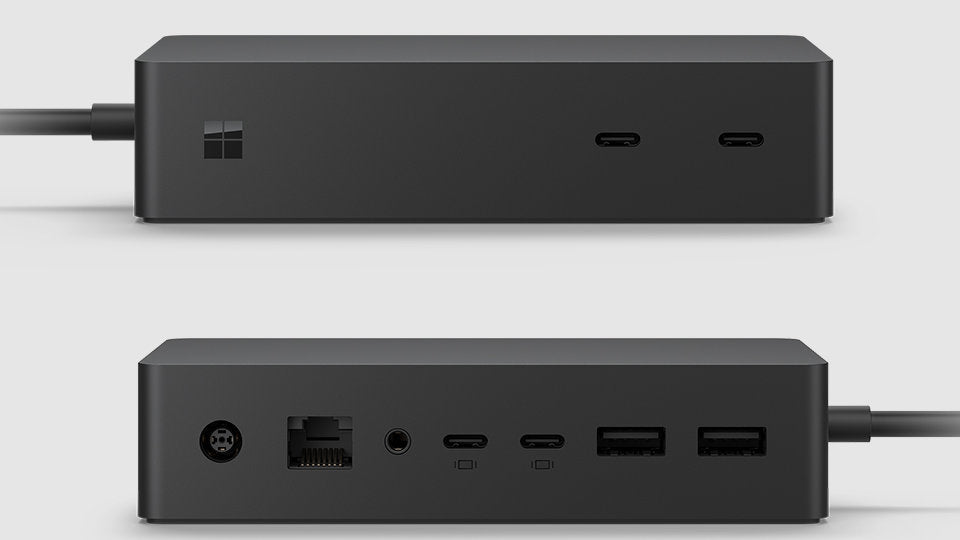
Best Docking Stations for Microsoft Surface Laptops
Discover the best docking stations for Microsoft Surface laptops to improve connectivity, support multiple displays, and create a more efficient workstation setup. Learn how to choose the right dock based on compatibility, performance, and everyday productivity needs.
Microsoft Surface Dock 2
The Surface Dock 2 is one of the most commonly recommended docking stations for Surface devices.
Features
- Dual 4K monitor support
- USB-C connectivity
- Surface Connect charging
- Ethernet support
- Multiple USB ports
Best For
- Office professionals
- Corporate workstations
- Dedicated Surface setups
Its optimized compatibility makes it one of the safest choices for Surface users.
USB-C Docking Stations for Hybrid Work
A microsoft surface laptop docking station with USB-C support is ideal for modern hybrid work environments.
Advantages
- Easy device compatibility
- Flexible connectivity
- Compact workstation setup
- Modern accessory support
Best For
- Remote workers
- Students
- Freelancers
- Shared workspaces
USB-C docking stations continue to grow in popularity because of their flexibility and future-ready connectivity.
Dell USB-C Docking Station
A dell usb-c docking station is another strong option for users seeking universal compatibility and professional workstation support.
Advantages
- Reliable enterprise performance
- Multiple display outputs
- Broad device support
- Strong peripheral management
Best For
- Corporate offices
- Multi-brand device environments
- Advanced workstation setups
How to Choose the Right Docking Station
Selecting the right docking station depends on how you use your Surface laptop every day.
Evaluate Your Workspace
Users with permanent office setups may benefit from larger desktop docks, while remote workers may prefer compact portable docking stations.
Consider Future Expansion
Purchasing a dock with additional ports can help avoid upgrades later as your connectivity needs grow.
Check Compatibility Carefully
Different Surface models support different connection standards. Always verify:
- USB-C support
- Thunderbolt compatibility
- Surface Connect support
- Charging requirements
- Monitor limitations
The Microsoft docks collection includes several docking solutions designed specifically for Surface devices.
Benefits of Refurbished Docking Stations
Many professionals now purchase refurbished docking stations to reduce costs while still accessing reliable hardware.
Benefits include:
- Lower purchase costs
- Reduced electronic waste
- Access to premium hardware
- Reliable workstation performance
Companies such as Docks4U trade-in services support docking station reuse and refurbishment programs.
How Docking Stations Improve Remote Work
Remote work has increased the need for organized workstation setups. Docking stations help users create efficient home office environments.
Easier Workstation Setup
One connection can instantly activate:
- Monitors
- Keyboard
- Mouse
- Ethernet
- Audio systems
- External storage
Better Ergonomics
Docking stations support external monitors and accessories that create more comfortable work environments.
Reduced Cable Clutter
A centralized docking setup helps maintain cleaner and more organized desks.
Understanding Surface Compatibility
Compatibility depends heavily on your specific Surface model.
Older devices often rely on Surface Connect ports, while newer Surface laptops increasingly support USB-C and Thunderbolt technology.
Before purchasing a microsoft surface laptop docking station, confirm:
- Device model
- Port compatibility
- Display requirements
- Charging support
- Operating system compatibility
Additional compatibility information is available on the About Us page.
Conclusion
A docking station can significantly improve the functionality of Microsoft Surface laptops by expanding connectivity, supporting multi-monitor setups, and simplifying workstation management. Whether you choose an official microsoft surface docking station, a versatile microsoft usb c docking station, or a universal dell usb-c docking station, selecting the right dock depends on your workflow and compatibility needs.
Understanding display support, charging capabilities, connectivity options, and workspace requirements helps ensure you choose a docking station that improves long-term productivity and efficiency.
For additional assistance choosing the right docking solution for your Surface device, visit the contact page.