


How Laptop Docking Stations Improve Multi-Monitor Productivity
Modern workplaces demand efficiency, flexibility, and seamless connectivity. Whether working from a home office, a corporate environment, or a shared workspace, professionals often rely on multiple screens to manage tasks, analyze data, communicate with teams, and improve overall productivity. A docking station has become an essential tool for creating a streamlined multi-monitor setup that supports these needs.
At Docks4U, businesses and individuals can explore a wide selection of docking stations for laptops designed to support modern workflows. Understanding how these devices improve productivity can help users make informed decisions when upgrading their workstation. For those looking to enhance connectivity, streamline desk setups, and improve multi-device performance, exploring a comprehensive range of laptop docking solutions for modern workspaces available at Docks4U can provide valuable insights and options.
What Is a Laptop Docking Station?
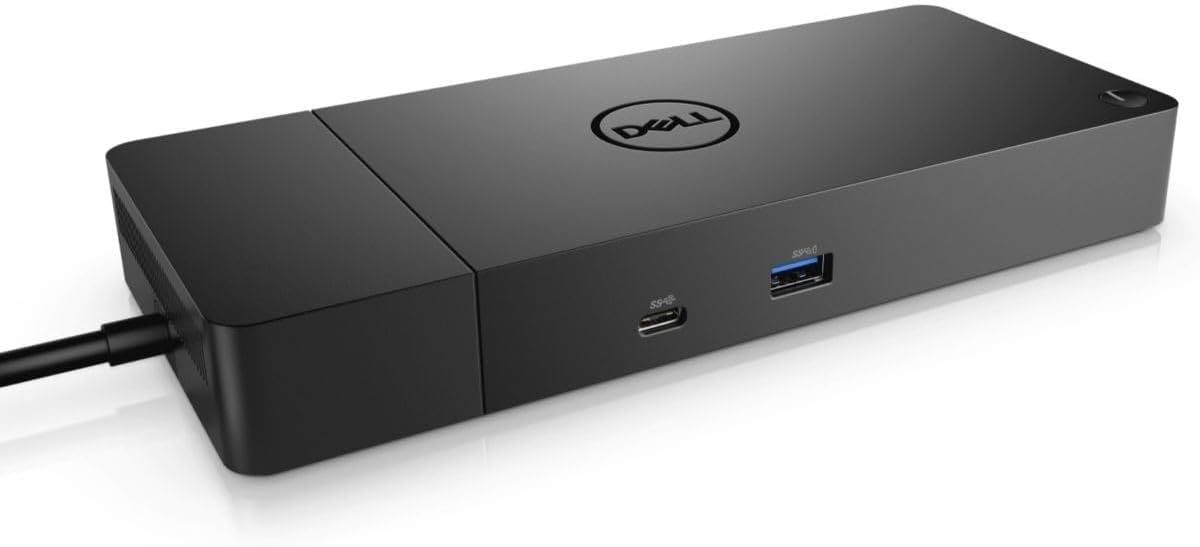
A laptop docking station is a hardware device that expands the connectivity options of a laptop. It allows users to connect multiple monitors, keyboards, mice, external storage devices, printers, network cables, and other peripherals through a single connection.
Instead of plugging numerous cables into a laptop every day, users can connect everything through one dock, simplifying workstation management and improving efficiency.
Key Features of Docking Stations
Most docking stations provide:
- Multiple display outputs
- USB connectivity
- Ethernet ports
- Audio connections
- Charging capabilities
- SD card readers
- High-speed data transfer
Businesses and remote workers can browse various docking station solutions for enhanced productivity and connectivity to find models that suit their specific requirements.
Why Multi-Monitor Setups Improve Productivity
Research and workplace studies consistently show that multiple monitors can enhance efficiency by reducing the need to switch between applications and windows.
Common Multi-Monitor Workflows
Professionals often use multiple screens for:
| Profession | Multi-Monitor Use Case |
|---|---|
| Financial Analysts | Spreadsheets, dashboards, and reports |
| Developers | Coding, testing, and documentation |
| Designers | Creative software and reference materials |
| Project Managers | Communication tools and task tracking |
| Customer Support Teams | CRM systems and customer interactions |
| Content Creators | Editing software and asset management |
With a properly configured docking station, users can seamlessly manage these workflows without sacrificing performance.
How Docking Stations Support Multiple Displays
One of the biggest advantages of modern docking stations is their ability to connect several monitors simultaneously.
Expanded Screen Real Estate
Additional screens provide more workspace, allowing users to:
- View multiple applications at once
- Reduce window switching
- Compare documents side by side
- Monitor communication channels continuously
- Improve focus and workflow organization
For example, a financial analyst may dedicate one monitor to spreadsheets, another to market data, and a third to communication platforms.
Improved Task Management
A multi-monitor setup enables users to organize tasks more effectively.
Instead of minimizing and maximizing windows repeatedly, users can assign dedicated screens to specific functions. This creates a more structured workflow and reduces interruptions.
Benefits of Docking Stations for Laptops in Professional Environments
Docking stations for laptops enhance productivity in professional environments by enabling multi-monitor setups, expanding connectivity options, and reducing cable clutter. They also simplify workstation setup, allowing employees to connect all peripherals through a single connection and work more efficiently.
Enhanced Connectivity
Many modern laptops have limited ports due to their slim designs. Docking stations solve this problem by expanding connectivity options.
Benefits include:
- Additional USB ports
- HDMI and DisplayPort outputs
- Ethernet connectivity
- External storage support
- Peripheral integration
Organizations frequently invest in new docking stations to accommodate growing technology requirements.
Faster Workstation Setup
Docking stations significantly reduce setup time.
Instead of connecting multiple cables individually, users connect a single cable to the dock and instantly gain access to all connected devices.
This is especially valuable for:
- Hybrid employees
- Shared office environments
- Hot-desking setups
- Remote workers
Improved Cable Management
A cluttered workspace can negatively impact productivity and organization.
Docking stations centralize connections and reduce cable clutter, resulting in:
- Cleaner desks
- Easier troubleshooting
- Better equipment organization
- More professional workspaces
Portable Docking Stations for Mobile Professionals
Not every user works from a permanent desk. Many professionals require flexibility while traveling or working remotely.
Advantages of Portable Docking Stations
Portable docking stations offer:
- Lightweight designs
- Compact form factors
- Easy transport
- Multi-monitor support
- Flexible connectivity
These devices are ideal for:
- Business travelers
- Consultants
- Field professionals
- Remote workers
- Hybrid employees
Portable solutions allow users to maintain productivity regardless of location while still benefiting from expanded display capabilities.
New Docking Stations vs Refurbished Docking Stations
When selecting a docking solution, buyers often compare new and refurbished options.
New Docking Stations
New docking stations typically provide:
- Latest connectivity standards
- Manufacturer warranties
- Updated compatibility
- Current technology features
These solutions may be preferred by organizations implementing large-scale workstation upgrades.
Refurbished Docking Stations
Refurbished docking stations offer an alternative for budget-conscious buyers.
Benefits often include:
- Lower acquisition costs
- Tested functionality
- Sustainable equipment reuse
- Access to enterprise-grade hardware
Many businesses use refurbished equipment to reduce technology expenses while maintaining reliable performance.
Users interested in learning more about available options can explore the About Us section to better understand the company’s approach to docking station solutions.
How Docking Stations Improve Workflow Efficiency
Beyond supporting additional monitors, docking stations contribute to broader productivity improvements.
Reduced Device Wear and Tear
Constantly plugging and unplugging peripherals can place strain on laptop ports.
Using a docking station reduces direct port usage, helping preserve the laptop's physical connections over time.
Better Ergonomics
Multi-monitor setups supported by docking stations encourage more ergonomic work environments.
Users can:
- Position monitors at eye level
- Use external keyboards and mice
- Maintain better posture
- Reduce neck strain
Improved ergonomics can contribute to greater comfort during extended work sessions.
Enhanced Collaboration
Docking stations simplify collaboration by enabling quick connections to:
- Presentation displays
- Conference room monitors
- Shared workstations
- Video conferencing equipment
This flexibility is particularly beneficial in modern hybrid workplaces.
Choosing the Right Laptop Docking Station
Not all docking stations are identical. Selecting the right solution depends on specific requirements.
Important Considerations
1. Display Support
Verify the number of monitors supported and maximum display resolutions.
Connectivity Options
Look for:
- USB-A ports
- USB-C ports
- HDMI outputs
- DisplayPort connections
- Ethernet support
2. Power Delivery
Many modern docking stations can charge laptops while simultaneously handling data and display connections.
Compatibility
Ensure compatibility with:
- Operating systems
- Laptop manufacturers
- USB-C or Thunderbolt standards
- Corporate IT requirements
Reviewing available docking stations for laptops can help identify solutions that match workplace needs.
Sustainable Technology Through Dock Reuse
As technology evolves, organizations frequently upgrade equipment. This creates opportunities for extending the lifespan of existing hardware.
The Growing Secondary Docking Station Market
Businesses often replace large numbers of docks during hardware refresh cycles. Rather than disposing of these devices, organizations increasingly choose resale and refurbishment options.
Services focused on we buy docks programs help businesses recover value from surplus equipment while supporting sustainability initiatives.
Why Companies Sell Docking Stations
Organizations may choose to sell my docking station inventory for several reasons:
- Hardware upgrades
- Office relocations
- Workforce changes
- Technology standardization
- Inventory reduction
Responsible resale and refurbishment reduce electronic waste while maximizing asset value.
Common Industries Benefiting from Docking Stations
Docking stations are useful across a wide range of industries.
- Information Technology: IT professionals often manage multiple systems and monitoring tools simultaneously.
- Finance: Financial teams benefit from real-time access to dashboards, reports, and communication platforms.
- Healthcare Administration: Administrative staff frequently work across multiple software systems requiring extensive screen space.
- Education: Educators and administrators use docking stations to connect displays, projectors, and instructional technology.
- Creative Services: Designers, editors, and content creators often require several displays to manage complex projects efficiently.
Future Trends in Docking Technology
The demand for flexible work environments continues to drive innovation.
Emerging developments include:
- Higher display resolutions
- Increased power delivery capabilities
- Faster data transfer speeds
- Universal compatibility standards
- Enhanced support for remote work environments
As workplace technology evolves, docking stations will continue to play a central role in productivity-focused workstation design.
Conclusion
A laptop docking station can significantly improve multi-monitor productivity by simplifying connectivity, expanding display capabilities, reducing workspace clutter, and enhancing workflow efficiency. Whether users choose new docking stations, portable docking stations, or refurbished docking stations, the right solution can create a more productive and organized work environment.
Businesses looking to upgrade existing workstations, purchase quality docking solutions, or explore options to sell my docking station inventory through we buy docks programs can find additional information by visiting the Contact Us page.